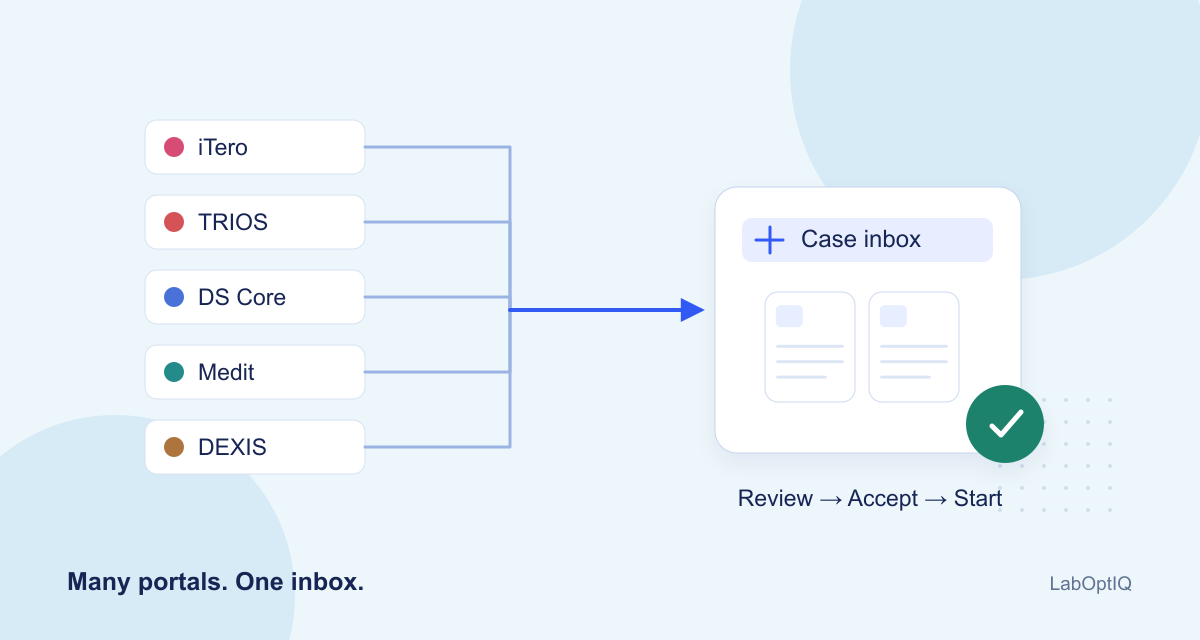
A case can be ready for your lab long before your team knows it exists.
It might be waiting in iTero. Another may have arrived through TRIOS and 3Shape. A third is in DS Core, with more in Medit or DEXIS. As your clinic network grows, so does the list of places your intake team needs to watch.
The result is a familiar routine: open a portal, check for new work, find the case, download the files, open your lab management software, upload the files, and enter the details again. Then repeat. The digital impression has arrived, but the lab case still needs to be assembled.
The portal-checking loop is work, too.
Imagine the start of a typical intake shift. Someone opens several browser tabs and checks each portal. Some have a new case. Some have nothing. A download needs attention. A prescription is missing a detail. A colleague asks whether a particular order has already been picked up.
By the next round of checks, more work may have arrived. The team has to revisit the same places, including the ones that were empty a few minutes earlier. Every additional portal adds another place to check and another handoff to manage.
The problem is not that scanner portals have no value. They connect practices and labs within their own workflows. The challenge for a lab receiving work from several ecosystems is maintaining one operational view across all of them.
From “Has anything arrived in any of our portals?” to “Which incoming cases need our review?”
One inbox gives incoming work a clear starting point.
A consolidated case inbox brings incoming work from connected scanner sources into one list. The source still matters, but your team no longer needs to organize its entire working day around that source.
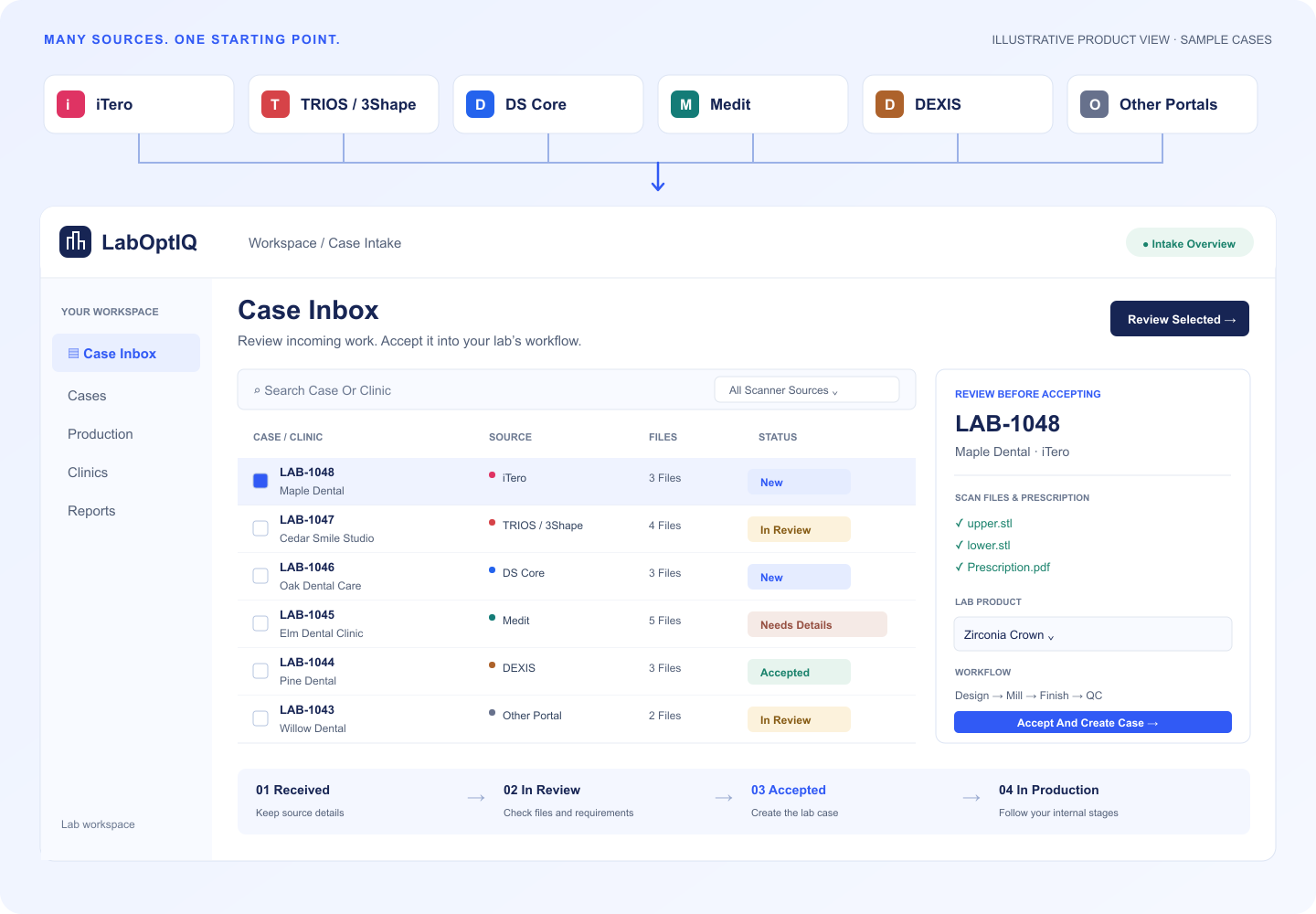
This is the intake experience LabOptIQ is designed around: receive, review, accept, and move the case forward. The inbox becomes the place where a person can decide whether the work is ready, rather than just a directory of downloaded files.
1. See the incoming case with its source.
Keep the originating portal visible alongside the clinic, received time, case reference, and available files. A shared queue helps the team see what is new and what someone is already reviewing.
2. Review the details before committing the work.
Check the prescription and available scan files. Confirm the requested product, material, due date, and any information your lab needs. If something is incomplete, keep the case in review and clarify it before production starts.
3. Accept it into your lab’s structure.
Once the case is ready, map the incoming information to your lab’s product catalog, clinic record, and workflow. Acceptance should create an actionable lab case with the right context attached.
A shared inbox does not remove the review step. It makes the review step more deliberate, with fewer disconnected places to look.
The inbox is the start. The handoff is the point.
Collecting files in one screen is useful. Connecting them to the work your lab needs to do is more useful. An accepted crown case, for example, should enter the relevant internal stages with the files and requirements still attached.
From there, your production process might include design, manufacturing, finishing, and quality control, followed by invoicing and shipping. The exact stages should follow your lab’s way of working.
LabOptIQ’s goal is to connect intake with that wider case journey while working alongside existing systems. Design software, your current LMS, shipping tools, and invoicing systems should be part of the integration conversation. Whether cases are created within LabOptIQ, passed to an existing LMS, or synchronized across systems depends on the agreed integration scope.
Evaluate the workflow, not just the list of logos.
Before choosing a multi-scanner intake solution, bring one representative case from each of your important portals. Walk through the details your team actually handles, including the exceptions.
- Which sources are supported for our accounts? Confirm the exact portal, account permissions, authorization method, region, and any vendor prerequisites.
- What arrives with the case? Check scan files, prescriptions, attachments, clinic details, due dates, and whether the necessary metadata can be retrieved.
- How are delays and failures made visible? Ask how the team sees connection problems, incomplete downloads, changed cases, and work that needs another attempt.
- What prevents a duplicate? Review how source references are matched when a case is refreshed, amended, or received again.
- What happens when we accept? Follow the accepted case into your product structure and production stages. If you keep an existing LMS, verify that handoff too.
Supporting a file format is not the same as having an authorized integration with a portal. File availability, export settings, account access, and vendor approval can affect the workflow. Confirm these details during your evaluation rather than assuming every portal behaves the same way.
View A Workflow Example
Your next case shouldn’t need a portal tour.
Bring your scanner portals, current LMS, and one real intake workflow to a LabOptIQ demo. Let’s explore how incoming work could reach one review queue and move into your lab’s production process.
Book A Case Intake DemoCommon questions from lab teams
Can cases from different scanner brands appear in the same inbox?
That is the intended unified-intake workflow. The exact sources available to your lab depend on supported integrations and your portal access. Confirm the portals you use during the demo.
Does every case arrive as an STL file?
No. Platforms and export settings vary. A workflow may involve STL, PLY, OBJ, prescription documents, or other attachments. Check the files your design process needs rather than treating STL as the whole case.
Do we have to replace our existing LMS?
LabOptIQ is positioned to work alongside existing systems. Compatibility, data mapping, and whether an accepted case can be created or updated in your current LMS need to be confirmed for that specific integration.
Does a case go straight into production without review?
The workflow described here keeps intake review explicit. Your team checks the information, resolves questions, and accepts the case before it enters the agreed production stages.
Platform context & further reading
Vendor documentation describes individual platform workflows; these sources do not establish a LabOptIQ partnership or confirm a live integration.
- iTero: LMS integration documentation and export settings
- 3Shape: How clinic-to-lab case status updates work
- Dentsply Sirona: DS Core for dental labs
- Medit: Case data transfer and file export
- DEXIS: IOS Cloud and open file workflows
iTero, TRIOS, 3Shape, DS Core, Medit, and DEXIS are names of their respective owners. The product illustration contains fictional records and describes an intended intake experience.