A technician opens a crown case and finds the material is unclear. The coordinator checks a spreadsheet, searches an email thread and asks the clinic for clarification. Meanwhile, the production slot reserved for that case sits unused, or another case has to be moved into it.
The missing detail may be small. The interruption reaches several people.
For a laboratory owner, this is a question about how work enters the business: does your team accept a case because it has arrived, or because someone has confirmed it is ready?
A standardized intake checklist makes that distinction visible. An LMS with mandatory acceptance checks can help enforce it, provided the rules reflect the cases your lab actually produces.
Why Case Intake Deserves an Owner's Attention
Incomplete information can travel a long way before someone notices it. A prescription sits in an email, scan files live on a desktop, and a shade clarification arrives in a chat. A spreadsheet may show “Received” without revealing what is still unresolved.
When the designer discovers the gap, the case has already entered the production plan. The team now has to pause work, find the latest instruction, contact the clinic and decide whether the promised date is still realistic.
An intake review moves that conversation earlier. It can expose missing information before the lab commits production capacity. It also gives the clinic a specific request instead of a vague “please check this case” message.
This is a shared process. The American College of Prosthodontists' statement on the dentist–laboratory relationship calls for complete prescriptions and recommends contacting the dentist when directions are unclear. The checklist below translates that communication principle into an operational review process; it is not a universal clinical protocol.
Separate Receipt, Review, Acceptance and Production
Use clear milestones so everyone understands what a status means:
- Received: The lab has received a submission or physical case. Completeness has not yet been confirmed.
- In Review: An assigned person is checking the information and required records.
- Awaiting Clarification: A specific issue needs a response or further review. The case has an owner and a next action.
- Accepted: The applicable intake checks are complete, required concerns are resolved, and the lab has confirmed the work and delivery commitment.
- In Production: The accepted case has been released into the appropriate production workflow.
Use labels that fit your lab's process. What matters is that downloading a file does not silently become approval to manufacture.
Show cases awaiting clarification in their own visible queue. Removing them from production readiness should not make them disappear from the team's workload.
A Practical Dental Lab Case-Intake Checklist
Define the checklist with your qualified technical team and prescribing clinicians. Required records vary with the restoration, material, treatment stage and applicable professional requirements. Administrative checks and clinical or technical review may need different reviewers.
1. Confirm the Patient, Clinic and Prescribing Doctor
- Match the patient reference, clinic and prescribing doctor to the submission.
- Check that the prescription and attachments belong to the same case.
- Record the source reference so a revised submission can be connected to the existing record.
- Confirm who at the clinic can answer questions and how the team should contact them.
Use the patient information necessary for the task and your approved access procedures. A filename alone is a weak way to identify a case, particularly when several submissions arrive from the same clinic.
2. Review the Prescription, Restoration and Material
- Confirm the prescribed restoration or appliance, relevant tooth notation and stage of work.
- Verify that the prescribed material and case instructions are clear and consistent.
- Identify the current prescription revision and any required authorization.
- Resolve conflicting instructions before marking the item complete.
Do not fill an empty material field from a previous case or a coordinator's assumption. A checklist should prompt the appropriate clarification and review. A populated field does not prove that someone has checked its meaning.
3. Check Shade Information Where Applicable
- Confirm that the prescribed shade and shade reference system are clear where required.
- Check for stump shade, reference photographs or characterization instructions when relevant to the prescribed restoration and your agreed protocol.
- Ensure that later shade instructions are connected to the case and reviewed against the prescription.
Avoid requiring the same shade records for every case type. A permitted “Not Applicable” response should follow the case rules, with an explanation where needed, rather than becoming a shortcut around a required review.
4. Verify the Required Scans, Bite Records or Physical Inputs
- Confirm that the required scan package or physical records have arrived for this case type.
- Check that files open, match the case and represent the intended submission or revision.
- Route scan completeness, bite registration and other technical concerns to the appropriately qualified reviewer.
- For physical cases, record receipt and follow the lab's approved handling and infection-control procedures.
File presence is only the first check. An attachment can be readable yet still require clarification or technical review. Keep those decisions separate.
Scanner guidance also varies by workflow. For example, 3Shape's Unite Automate crown-workflow guide specifies upper and lower scans and describes the bite scan as optional but highly recommended for that particular service. Your intake rules should follow the relevant workflow and approved case requirements rather than treating one file list as universal.
5. Confirm Dates, Delivery and Special Instructions
- Record the clinic's requested date separately from the lab's confirmed delivery commitment.
- Review capacity, required approvals and delivery arrangements before confirming the date.
- Identify special instructions, try-in stages or other case-specific dependencies.
- Make any unresolved question visible to the person responsible for acceptance.
A rush label should trigger a timely review of feasibility. It should not remove required information checks. If clarification changes the schedule, communicate the revised commitment explicitly.
6. Record Who Reviewed and Accepted the Case
- Record the reviewer, completion time and relevant prescription or file revision.
- Keep clarification messages and decisions linked to the case.
- Confirm the next workflow, responsible team and any required review points.
- Give acceptance authority to the appropriate people under your lab's procedures.
The outcome should be a usable handoff: what the lab has accepted, which records support that decision, and who takes the next action.
Does Your LMS Enforce the Checklist Before Acceptance?
A checklist displayed on a case page may be a useful reminder. To make it mandatory, the system needs to connect completion to the acceptance action. Ask a vendor to demonstrate the following behavior using ordinary staff accounts.
Required checks block acceptance when incomplete. Leave a required item unresolved and attempt to accept the case. The system should explain what needs attention and keep the case out of the production-ready queue.
Rules change with the case type. A crown, an implant restoration and a removable appliance should not inherit an identical list without review. Confirm which items are required, conditional or not applicable, and who can change those rules.
Completion records a review, not just a value. Automatically detecting an attached file can save effort, but it should not impersonate a qualified person's assessment of that file. Ask how the system distinguishes information received from information reviewed.
Holds have an owner and follow-up. The lab should be able to see the missing item, the clarification requested, who is following up and when the case will be reviewed again.
Revisions prompt appropriate re-review. If the prescription, material or relevant files change after acceptance, the affected approval should be reviewed again under the lab's rules. The earlier acceptance should remain traceable to the records it covered.
Exceptions are controlled and visible. Some operational checks may allow an authorized exception with a documented reason. Required clinical information and authorization must still be resolved under the lab's procedures. Ask which checks cannot be bypassed and how any permitted exception appears in the case history.
Check bulk acceptance and every other supported intake route too. A mandatory checklist loses its value if another routine action can bypass it.
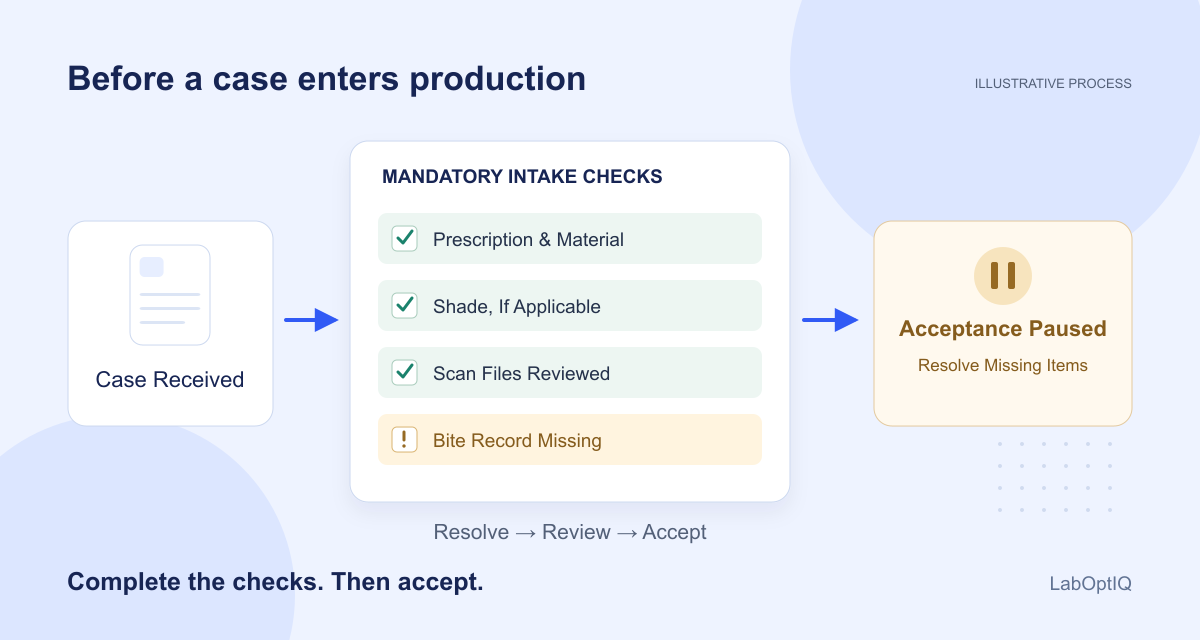
Example: A Case Arrives Without a Required Bite Record
Consider a fictional crown case for which the lab's approved intake protocol requires a bite record. The scan package arrives, but that record is missing and the material instructions conflict with a later message.
The coordinator records receipt and opens the intake review. Patient and clinic references match, but the records and prescription checks remain incomplete. The case moves to “Awaiting Clarification,” with the coordinator assigned to follow up.
The clinic receives a specific request: provide the required bite record and confirm the current material instruction. The lab does not guess the material or send the case to design to resolve later.
When corrected information arrives, it is linked to the same case. The appropriate reviewer checks the updated records, the team confirms a feasible delivery date, and an authorized person accepts the case. Production receives the reviewed instructions and the relevant revision.
The case stays visible throughout, with a clear owner and next action. Production starts from reviewed information rather than an unresolved request.
Make the Checklist Useful Enough to Follow
A long list of generic questions can become another administrative burden. Start with the missing inputs and conflicting instructions your team actually encounters.
Write each check as a clear review action. “Current prescription reviewed and material confirmed” gives the reviewer more direction than “Rx OK.” Keep the supporting prescription, file or clarification close to the check so staff do not have to search unrelated folders.
Avoid a “Select All” habit that marks reviews complete without performing them. Reuse information already captured, but preserve responsibility for the decisions that need human assessment. Give staff a clear route to ask for help when they cannot complete a check.
Tell clinics what is required before submission where possible. A lab-side acceptance checklist still matters when information arrives through different scanner portals, email or physical deliveries: every source should reach the same agreed intake standard.
Measure Whether Intake Is Improving the Business
Pilot the process with one common case type and review the results with intake and production staff. Useful measures include:
- First-review completeness: The share of reviewed cases that meet the applicable intake requirements without clarification.
- Time to acceptance: Elapsed time from receipt to acceptance, with waiting for the clinic distinguished from internal review time.
- Open-hold age: How long unresolved intake issues have been waiting, grouped by reason and owner.
- Clarification rounds: How many exchanges are needed to resolve the missing or conflicting information.
- Downstream intake issues: Cases paused after acceptance because an intake requirement was missed.
Keep definitions and denominators consistent. A higher first-review pass rate means little if staff are skipping required checks. Review the record behind the measure, and investigate remake causes separately; an intake checklist cannot prevent every design, manufacturing or clinical issue.
Use your own baseline to judge improvement. There is no universal time-saving percentage that every laboratory should expect.
Bring an Incomplete Case to Your Next LMS Demo
Ask the vendor to work through a realistic submission with one missing requirement. Watch what happens when an ordinary intake user attempts acceptance, how a clarification is assigned, and how a corrected revision is reviewed.
Then ask: can the case enter production while a mandatory intake check is still unresolved? Request a clear answer for the specific product, configuration and workflow being proposed.
For a LabOptIQ demo, bring your current checklist and one anonymized example of an intake problem. Ask the team to confirm which checklist, acceptance, permission and revision-review capabilities are available and what configuration or further work your process would require.
Your lab can start with a simpler question today: take a recent delayed case and identify which missing detail could have been caught before acceptance. Use that finding to define the first check your team needs to perform consistently.
Explore this workflow with your team.
Bring your cases, scanner sources, and existing tools to a LabOptIQ demo. Confirm the handoffs, available features, and integration scope that matter to your lab.
Book A Workflow Demo